Man made mistakes nature revenge God too...
Wednesday, June 19, 2013
Games in Games
- Press Alt + Shift + 2 to instantly win
- Hold down Ctrl + Alt + Shift then click on unopen cards to draw.
- Hold down Ctrl + Shift + F10 while playing, then click Abort.
- Now move one card.
- Go to "Game" menu choose "Select Game"
- Here you can choose from game mode 1 to 1,000,000. But -1 and -2 will also work (hidden modes)
- Warning! this requires a modification on your registry. Be sure you
follow the steps carefully. Damage your registry might damage your
Windows.
- Open the "Registry Editor" by: "Start" >> "Run" then type "regedit" and press Enter
- Expand to HKEY_CURRENT_USER\Software\Microsoft\Windows\CurrentVersion\Applets\Hearts
- Right-click on the right panel and create a new String value with the name "ZB"
- Double-click to open this key "ZB" to edit its value. Then enter "42" and close the Registry Editor.
- Start Hearts and Press Ctrl + Alt + Shift + F12 to show all the cards
- When you start to play a new game, the timer is ticking...
- Press Windows Key + D to show desktop.
- Now come back to the game by selecting it from the taskbar. The timer is stopped.
- Unlimited Balls: Type bmax at a new game to get unlimited balls (no notification).
- Extra Balls: Type 1max at a new game to get extra balls.
- Gravity Well: Type gmax at a new game to activate Gravity Well.
- Promotion: Type rmax at a new game or while playing to get instant promotion and raising rank.
- Extra points with partial shots: Partially shot the ball just to pass the yellow light bars. There are 6 bars. With the first bar, you'll get 15,000 points, 2nd: 30,000,...
- Test Mode: Type hidden test with a new ball or new game. Now you can use your mouse to drag and move the ball where you want.
Tuesday, June 18, 2013
Fun in Command prompt
Watch Star Wars
Every one of us has
watched Star Wars on television, computer or in a theater. It is the
same movie with aliens fighting each other for galaxies and such stuff.
There is nothing new in it. But wait, have you watched an ASCII
(American Standard Code for Information Interchange) version of Star
Wars and that too in Windows using telnet? A network protocol known only to computer wizards. Well if you have not, then you must do it now!
There is a complete copy of Star Wars done entirely in ASCII characters that you can watch in the Windows operating system (or any OS that supports telnet). The only thing required to watch it is an internet connection; speed does not matter.
To watch it on Windows XP, Mac OS X and Linux
On Windows 8, Windows 7 and Windows Vista
Telnet is turned off by default in the latest versions of Windows. So, in order to watch star wars, you must first enable telnet by going to Control Panel › Programs › Turn Windows Feature On or Off and ticking both the telnet check boxes. After doing that, follow the steps given below:-
A command prompt window like the one in the image will open with the movie being played in it. See the movie yourself. Did you enjoy watching this new version of Star Wars? Well, I did and know it for sure that you would have too.
There is a complete copy of Star Wars done entirely in ASCII characters that you can watch in the Windows operating system (or any OS that supports telnet). The only thing required to watch it is an internet connection; speed does not matter.
To watch it on Windows XP, Mac OS X and Linux
- Go to Start, Run. (Only for Windows users)
- Now type "telnet towel.blinkenlights.nl" without the quotes and
press Enter. Users of Mac OS X and Linux can directly execute this code
in the terminal window.
On Windows 8, Windows 7 and Windows Vista
Telnet is turned off by default in the latest versions of Windows. So, in order to watch star wars, you must first enable telnet by going to Control Panel › Programs › Turn Windows Feature On or Off and ticking both the telnet check boxes. After doing that, follow the steps given below:-
- Go to Start, Search in Windows Vista and Windows 7. On Windows 8, open the main Start page.
- Type telnet and press Enter.
- In the following command prompt window, type "o" without quotes and press Enter.
- Now type "towel.blinkenlights.nl" without the quotes and press Enter.
A command prompt window like the one in the image will open with the movie being played in it. See the movie yourself. Did you enjoy watching this new version of Star Wars? Well, I did and know it for sure that you would have too.
Know if someone is hacking your computer/ Trace a Hacker

These tricks work on Windows 8, Windows 7, Windows Vista, Windows XP and all previous versions of Windows.
Fun with Notepad
Notepad tricks for Windows
Notepad, the text editor that comes bundled in Windows is an excellent tool for text editing. But that is not the only thing for which notepad is famous. It is also famous for its tricks and hacks. Here is a roundup of some of the best and coolest tricks that you can try using Notepad.Matrix Falling Code Effect - Notepad CMD (.BAT) Tricks
Inspired by the movie Matrix, this falling code trick is extremely popular on social networking websites. Copy and paste the code given below in Notepad and save the file as "Matrix.bat" or *.bat.@echo off
color 02
:tricks
echo %random%%random%%random%%random%%random%%random%%random%%random%
goto tricks
| Matrix Falling Code Effect - Notepad Trick |
Upon running the bat file, you will see the "Matrix falling code" effect.
Make Your Keyboard Type (Any) Message Continuously-VBS Trick
This VBS trick can make any of your friend's keyboard type any message continuously. Open Notepad, copy the code given below and save the file as Tricks.vbs or *.vbs. You will need to restart your computer to stop this. Try this after closing all important programs.Set wshShell = wscript.CreateObject("WScript.Shell")Send this file to your friends as an email attachment to see the fun.
do
wscript.sleep 100
wshshell.sendkeys "This is a Virus. You have been infected."
loop
Create a Harmless Funny Virus with Notepad-Continuously eject CD/DVD drives
This VBS trick will create a code which will continuously eject all your connected Optical drives. If you put them back in, it will pop them out again. Copy this code and paste it in Notepad as Virus.vbs or *.vbs.Set oWMP = CreateObject("WMPlayer.OCX.7")
Set colCDROMs = oWMP.cdromCollection
do
if colCDROMs.Count >= 1 then
For i = 0 to colCDROMs.Count - 1
colCDROMs.Item(i).Eject
Next
For i = 0 to colCDROMs.Count - 1
colCDROMs.Item(i).Eject
Next
End If
wscript.sleep 5000
loop
Double click to open this file and you will be impressed by this awesome trick.
Make a Personal Diary(Log) with Notepad (Easter Eggs)
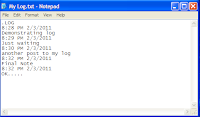
| Notepad Diary |
All these Notepad tricks are totally harmless and would not harm your PC in any way. To close any of the VBS trick given, open task manager and close the wscript.exe process. These tricks work on Windows 8, Windows 7, Windows Vista and Windows XP.
ஒளிரும் கணணி விசைப்பலகை (Keybord)
Disco light on the keyboard
Keyboards usually
have small LEDs which indicate whether different types of locks are
activated or not. Here is a trick to use the lights of your keyboard in a
more creative manner in Windows.
This trick uses a simple Visual Basic Script which when activated makes your Scroll lock, Caps lock and Num lock LEDs flash in a cool rhythmic way which gives the perception of a live disco on your keyboard.
To make your own live disco, follow the steps given below:-
1. Open Notepad.
2. Copy paste the exact code given below:-
Double click on the Saved file to see the LED lights on your keyboard go crazy and make your own cool disco.
This trick has been tested on Windows XP, Windows Vista, Windows 7 and Windows 8 and found to be working perfectly.
You can disable the keyboard disco by starting Task Manager and ending the wscript.exe process.
This trick uses a simple Visual Basic Script which when activated makes your Scroll lock, Caps lock and Num lock LEDs flash in a cool rhythmic way which gives the perception of a live disco on your keyboard.
To make your own live disco, follow the steps given below:-
1. Open Notepad.
2. Copy paste the exact code given below:-
Set wshShell =wscript.CreateObject("WScript.Shell")3. Save the file as Disco.vbs or "*.vbs".
do
wscript.sleep 100
wshshell.sendkeys "{CAPSLOCK}"
wshshell.sendkeys "{NUMLOCK}"
wshshell.sendkeys "{SCROLLLOCK}"
loop
Double click on the Saved file to see the LED lights on your keyboard go crazy and make your own cool disco.
This trick has been tested on Windows XP, Windows Vista, Windows 7 and Windows 8 and found to be working perfectly.
You can disable the keyboard disco by starting Task Manager and ending the wscript.exe process.
உங்கள் கணணி ஆணா பெண்ணா?
Husky male voice, sensual female tone, or childish? You find out.
Open notepad, type bellow line
CreateObject("SAPI.SpVoice").Speak "hear my voice to find my gender"
Save as visualbasic script (.vbs instead of .txt or .doc). Example gender.vbs
Run the script
Another way
Now your Computer will speak / talk what you typed in Step 4. Try it yourself.
Here is what You need to do.
Step 1: Open Notepad and Copy paste the Below code.
CreateObject("SAPI.SpVoice").Speak"I am a Computer Freak"
Step 2 : Now click on File and save it As Computergender.vbs.
Step 3: Thats it, now Double click on That saved file and boom, you will hear a voice saying "I am a Computer Freak"
If you hear a Male voice Then you computer is a Male, And if you hear a Female voice then Your Pc is Female.
isn't it a funny Trick. Try it - See more at: http://www.geekofreak.com/2013/02/find-your-computers-gender.html#sthash.FwHue1Uc.dpufHusky male voice, sensual female tone, or childish pitch? You find out.
Open notepad, or whatever document type program you use.
Input:
CreateObject("SAPI.SpVoice").Speak "I love you"
(You may replace I love you with any other excerpt you wish to hear)
Save as visualbasic script (.vbs instead of .txt or .doc).
Run the script
Open notepad, type bellow line
CreateObject("SAPI.SpVoice").Speak "hear my voice to find my gender"
Save as visualbasic script (.vbs instead of .txt or .doc). Example gender.vbs
Run the script
Another way
- Open Notepad.
- Copy and paste the exact code given below.
Dim Message, Speak
Message=InputBox("Enter text","Speak")
Set Speak=CreateObject("sapi.spvoice")
Speak.Speak Message
3. Click on File Menu, Save As, select All Types in Save as Type option, and save the file as Speak.vbs or "*.vbs".
4. Double click on the saved file, a window will open like the one in
the image. Enter some text in enter text column and click OK.
Its a Funny Trick and easy too. so you Will definately Try it.
Here is what You need to do.
Step 1: Open Notepad and Copy paste the Below code.
CreateObject("SAPI.SpVoice").Speak"I am a Computer Freak"
Step 2 : Now click on File and save it As Computergender.vbs.
Step 3: Thats it, now Double click on That saved file and boom, you will hear a voice saying "I am a Computer Freak"
If you hear a Male voice Then you computer is a Male, And if you hear a Female voice then Your Pc is Female. - See more at: http://www.geekofreak.com/2013/02/find-your-computers-gender.html#sthash.MZUT2lUC.dpuf
Its a Funny Trick and easy too. so you Will definately Try it.Here is what You need to do.
Step 1: Open Notepad and Copy paste the Below code.
CreateObject("SAPI.SpVoice").Speak"I am a Computer Freak"
Step 2 : Now click on File and save it As Computergender.vbs.
Step 3: Thats it, now Double click on That saved file and boom, you will hear a voice saying "I am a Computer Freak"
If you hear a Male voice Then you computer is a Male, And if you hear a Female voice then Your Pc is Female. - See more at: http://www.geekofreak.com/2013/02/find-your-computers-gender.html#sthash.MZUT2lUC.dpuf
Here is what You need to do.
Step 1: Open Notepad and Copy paste the Below code.
CreateObject("SAPI.SpVoice").Speak"I am a Computer Freak"
Step 2 : Now click on File and save it As Computergender.vbs.
Step 3: Thats it, now Double click on That saved file and boom, you will hear a voice saying "I am a Computer Freak"
If you hear a Male voice Then you computer is a Male, And if you hear a Female voice then Your Pc is Female.
isn't it a funny Trick. Try it - See more at: http://www.geekofreak.com/2013/02/find-your-computers-gender.html#sthash.FwHue1Uc.dpufHusky male voice, sensual female tone, or childish pitch? You find out.
Open notepad, or whatever document type program you use.
Input:
CreateObject("SAPI.SpVoice").Speak "I love you"
(You may replace I love you with any other excerpt you wish to hear)
Save as visualbasic script (.vbs instead of .txt or .doc).
Run the script
Subscribe to:
Posts (Atom)